When people talk about digital color, they often mix together RGB, HEX, and CIELAB as if they are competing ways to describe the same thing. They are related, but they serve fundamentally different purposes.
- RGB is a color model used to create and display color with light
- HEX is shorthand notation for RGB values — the same system, different format
- CIELAB is a color space designed to represent color the way humans actually perceive it
That difference matters. If you are building software, designing for the web, or trying to analyze which colors genuinely look best together, these systems are not interchangeable.
The short version
- Use RGB to display color on screens
- Use HEX to write RGB colors conveniently in web code
- Use CIELAB to analyze, compare, and measure colors more like a human would perceive them
RGB and HEX tell a computer how to render a color. CIELAB helps a computer reason about how different two colors actually look.
What is RGB?
RGB stands for Red, Green, Blue. It is an additive color model — colors are created by combining different amounts of red light, green light, and blue light.
rgb(255, 0, 0)     = red
rgb(0, 255, 0)     = green
rgb(0, 0, 255)     = blue
rgb(255, 255, 255) = white
rgb(0, 0, 0)       = black
This works well for screens because displays emit light. By varying the intensity of red, green, and blue subpixels, a monitor can produce a huge range of visible colors.
Why RGB was created
RGB emerged from practical needs in color photography, television, and electronic displays. Its roots go back to 19th-century theories of human vision — specifically the idea that human color perception can be approximated through three primary sensitivities (roughly corresponding to long, medium, and short wavelength cone cells in the eye).
As color film, broadcast television, and computer displays developed through the 20th century, RGB became the natural engineering model because it matched how display devices could physically generate color.
The limitation of RGB
RGB was built around device output, not around human judgments of color difference.
That is the key limitation. A shift of 20 units in the red channel might be barely noticeable in one part of the spectrum and dramatically obvious in another. Equal numeric distances in RGB do not correspond to equal perceived differences. This makes RGB a poor tool for any task that requires reasoning about how similar or different two colors actually look.
What is HEX?
HEX is not a separate color model. In web and software contexts, HEX is simply RGB written in hexadecimal notation.
#FF0000 = rgb(255, 0, 0)   = red
#00FF00 = rgb(0, 255, 0)   = green
#0000FF = rgb(0, 0, 255)   = blue
#FFFFFF = rgb(255, 255, 255) = white
#000000 = rgb(0, 0, 0)     = black
The structure is #RRGGBB, where each pair is a number from 00 to FF (0 to 255 in decimal).
Why HEX became common
HEX became popular because it is compact and convenient for programming and web development. As HTML and CSS became widespread, developers needed a short way to specify RGB colors in code. Hexadecimal was already familiar in computing, so it became a natural shorthand.
HEX is short, easy to copy and paste, widely supported, and directly tied to screen color values. But conceptually, it solves none of RGB's limitations. If RGB is weak for perceptual reasoning, HEX is weak in exactly the same way.
What is CIELAB?
CIELAB (also called Lab or L*a*b*) is a color space defined by the CIE — the Commission Internationale de l'Éclairage, or International Commission on Illumination.
Unlike RGB, CIELAB was not designed for screens. It was designed to represent color in a way that better matches how humans perceive differences between colors.
The CIE and the need for standards
The CIE was founded in 1913 to create international standards for light and color measurement. Before that, industries like printing, textiles, lighting, and photography lacked a shared way to describe color precisely — consistency was difficult and color matching was largely subjective.
In 1931, the CIE introduced CIE XYZ, an important mathematical model for color measurement. This gave scientists and engineers a standardized numerical foundation for color. But XYZ had a significant problem: it was not perceptually uniform.
Two colors that were the same numeric distance apart in XYZ might not look equally different to a person. For industries that needed to know whether a color difference was humanly noticeable — fabric, paint, cosmetics, printing — this was a real problem.
The introduction of CIELAB
In 1976, the CIE introduced CIELAB to address this. The goal was a color space where distances between colors corresponded more closely to perceived visual differences. Equal distance = approximately equal perceived difference, anywhere in the space.
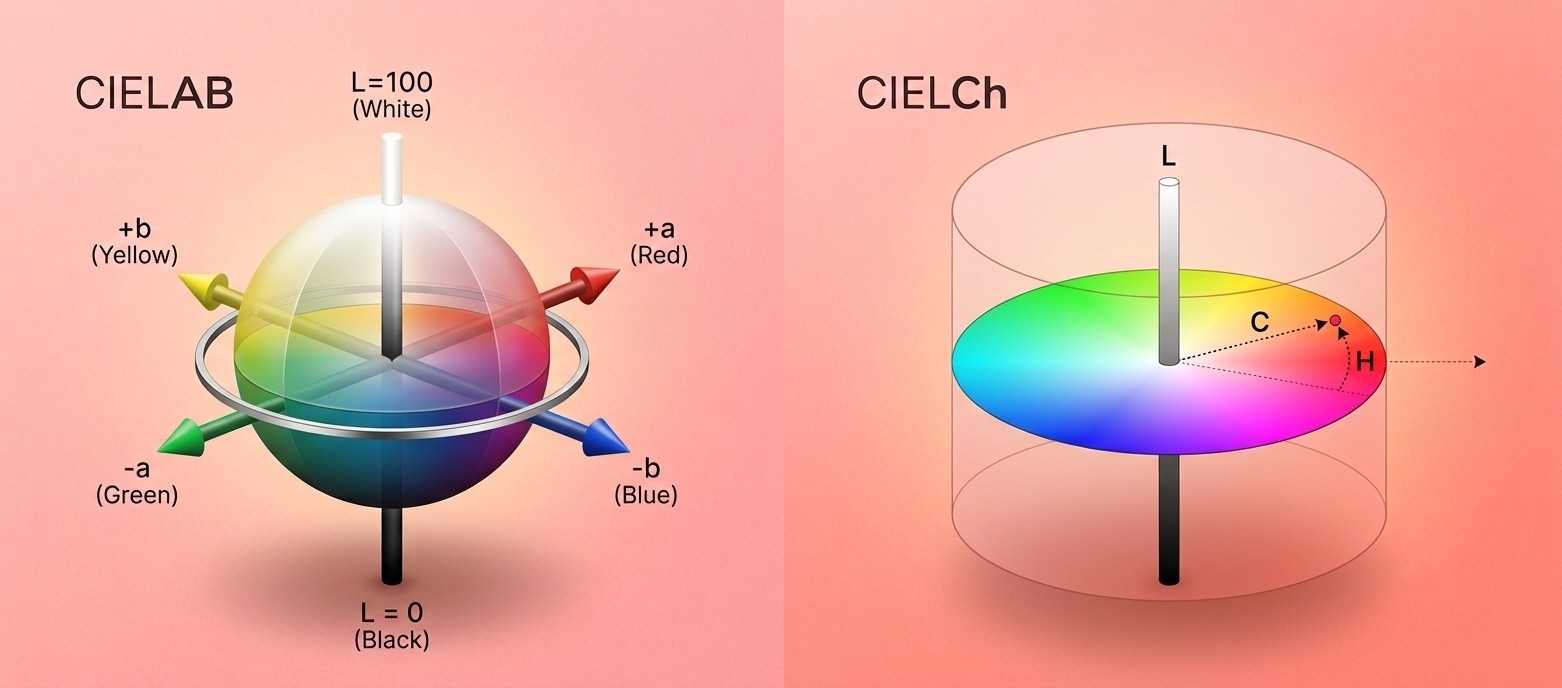
CIELAB uses three coordinates:
- L* — Lightness. 0 is pure black, 100 is pure white. The vertical axis of the sphere.
- a* — The red–green axis. Positive a* = more red. Negative a* = more green.
- b* — The yellow–blue axis. Positive b* = more yellow. Negative b* = more blue.
Notice that the a* and b* axes directly mirror the opponent color channels in human vision — the pairs your visual system uses to process color (red vs. green, and yellow vs. blue). This is intentional. CIELAB was built around perception, not around display hardware.
The impact of CIELAB
CIELAB became one of the most important color spaces for measurement and quality control. It is widely used in printing, textiles, paint, plastics, cosmetics, photography, and image processing.
It also enabled Delta E (ΔE) — a metric for measuring how different two colors appear. A Delta E of 1 is roughly the smallest difference a trained human eye can detect. A Delta E above 3-5 is typically visible to any observer. This gave industries a practical, human-relevant number for color tolerance and matching.
CIELCh — the practical companion
CIELCh is the same color space as CIELAB, expressed in cylindrical coordinates instead of Cartesian. It repackages a* and b* into two more intuitive values:
- L — same lightness axis as CIELAB
- C — Chroma: the distance from the center of the cylinder. Zero = neutral gray. Higher = more vivid and saturated.
- h — Hue angle: measured in degrees around the color wheel. 0° ≈ red, 90° ≈ yellow, 180° ≈ green, 270° ≈ blue.
LCh maps directly onto the three classic dimensions of color — the same framework Albert Munsell described in the early 1900s as Hue, Value, and Chroma. CIELAB and LCh give those concepts mathematical precision.
When a color is described as "warm, medium depth, muted," that translates directly to an LCh position: a hue angle in the warm range, a mid-range L* value, and a low-to-moderate C* value. LCh makes the connection between human language and measurable color coordinates explicit.
Why this matters for color analysis
RGB and HEX are the right tools for building a screen interface. They are the wrong tools for analyzing which colors look good on a person — and using them for that purpose produces meaningfully worse results.
When you sample skin color from a photo as an RGB value, you get a number that reflects how the camera encoded that pixel — influenced by the camera's sensor, the white balance setting, the lighting color temperature, and the JPEG processing applied. That number is not the same as a measurement of what the skin actually looks like to a human eye. The same person photographed under warm indoor light and cool daylight will produce very different RGB values, even though their coloring hasn't changed.
Converting to CIELAB removes the device bias and gives you a measurement that corresponds to human perception:
- L* measures depth directly — a fair complexion scores high, a deep complexion scores lower. Measurable, not guessed.
- a* and b* measure the two axes of undertone — warm vs. cool across two dimensions simultaneously, not a single binary proxy like vein color.
- C* measures chroma — how vivid or muted the coloring is, the dimension that most quiz systems ignore entirely.
- Delta E measures how different two colors actually appear to a human eye — the same magnitude of difference means the same thing anywhere in the space.
This is why rigorous color analysis — both professional draping and computational analysis — works in CIELAB. The numbers correspond to what the eye perceives, not what the camera or screen renders. A color distance of 5 Delta E means the same thing whether you're comparing two lip colors or two skin samples.
When a computational analysis tells you you're a True Autumn, that means your extracted L*, a*, and b* values place your coloring closest to the True Autumn centroid in CIELAB space — measured, not guessed.
The bottom line
RGB and HEX are engineering tools for rendering color on screens. CIELAB is a perception tool for reasoning about how color looks to humans.
For anything involving human color judgment — analysis, skin tone matching, palette recommendation, measuring harmony — CIELAB is the appropriate foundation. It's not an academic curiosity. It's the standard used in cosmetics formulation, textile manufacturing, print production, and every industry where the question is not "how does the screen show this?" but "how does this actually look to a person?"
Color analysis done in CIELAB is operating in the right domain. Analysis done in RGB is using a tool that was built for an entirely different job.